
Apollo Knowledge Magazine

Business guide8-minute readIT Room Rehab

IT Room Rehab: Bringing Order to Your Business Network

Your business has grown. Has your network room kept up? A practical guide to network rack cleanup, server room upgrades, and MDF/IDF organization for Chicagoland businesses.

In this article, you’ll learn

  • Which warning signs deserve attention
  • How to decide what stays and what changes
  • Why mapping and outage planning come before unplugging
  • What useful documentation looks like

Build Strong - Run Strong.

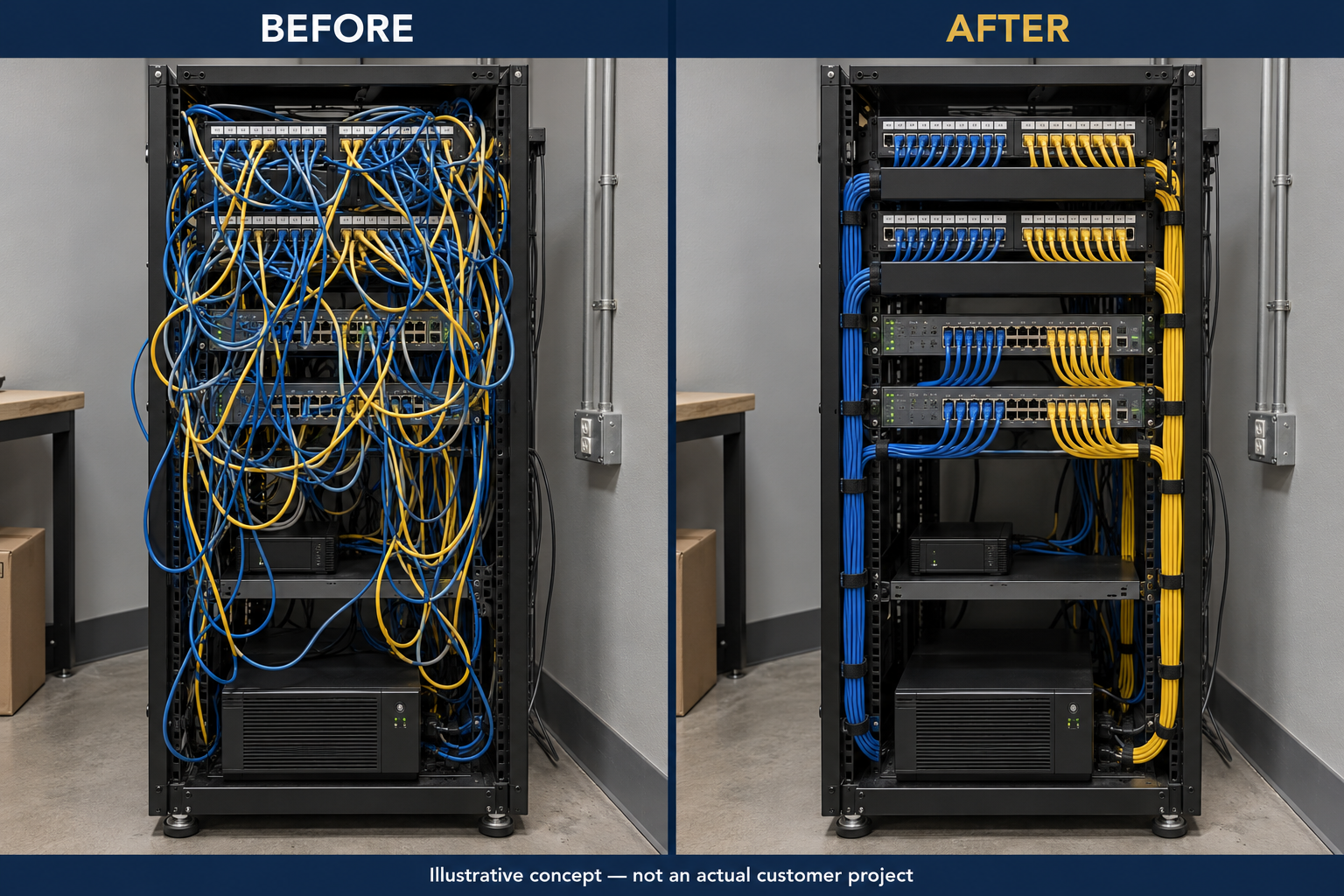
Illustrative before-and-after comparison of a network rack with tangled cables and neatly organized, labeled patch cords.
Network rack cleanupServer room upgradesStructured cablingMDF / IDFChicagoland

Quick Summary

A useful rehab improves serviceability—not just appearance.

An IT room can be small and still support critical work. Internet service, phones, wireless access points, cameras, and access control may all depend on the same rack. Organizing that infrastructure requires a plan that respects the business running on it.

01

Know what is connected

Trace, label, and document connections before moving them. An apparently unused cable may still serve a device that is offline or used only occasionally.

02

Keep what earns its place

Evaluate cabling, racks, switches, and power equipment against actual requirements. A messy rack does not automatically call for a complete replacement.

03

Plan the transition

Coordinate with the client’s IT provider, agree on an outage window, and define checks and rollback steps before work begins.

The goal is infrastructure your team can understand, maintain, and expand with confidence.

Before Anything Moves

A link light is not a complete connection map.

An IT room often grows one urgent addition at a time. Long patch cords, handwritten labels, stacked equipment, and abandoned-looking cables can accumulate until routine service becomes difficult.

Watch for patch cords stretched across equipment, inaccessible ports, unsupported devices, blocked ventilation, undocumented uplinks, and power strips whose connected loads are unclear. These conditions justify an assessment; they do not prove that every device or cable is faulty.

Do not disconnect a cable solely because it has no visible activity. Confirm its purpose with the system owner. Apollo coordinates physical infrastructure work with your IT team, who remains responsible for network administration and application decisions unless separately included in the scope.

Choose the Right Scope

Keep, Repair, or Replace?

Network room organization and technology replacement are separate decisions. Both should follow the evidence gathered during assessment.

Retain and organize

When the infrastructure still meets the need

A suitable rack, supported switches, and serviceable cabling may simply need better routing, labeling, mounting, and documentation. Keeping usable assets can preserve budget for the deficiencies that matter most.

  • Confirm available rack space, depth, and load suitability.
  • Evaluate existing links against the required applications.
  • Use appropriately sized patch cords and serviceable cable management.
  • Keep adequate access for maintenance and future changes.
Repair or upgrade selectively

When there is a specific shortfall

Damaged terminations, failing links, insufficient switch capacity, inadequate backup runtime, or a cabinet that cannot accommodate the equipment may warrant targeted changes. The reason should be explicit.

  • Identify the failure, limitation, or support concern.
  • Check equipment compatibility and manufacturer requirements.
  • Plan capacity for expected growth without buying speculative features.
  • Separate essential remediation from optional improvements.

Apollo’s approach is to fit the infrastructure to your needs, budget, and growth. Proven, supported equipment with a clear purpose belongs in the conversation. A newer product is not automatically a better business investment.

The Rehab Process

Assess First. Change Carefully. Document the Result.

A server room cleanup should have an agreed beginning, transition plan, and acceptance point. The exact sequence depends on the condition of the site and its operational needs.

  1. 01

    Assess the room and business dependencies

    Walk the MDF—the main distribution room—and any IDF satellite closets. Identify racks, patch panels, backbone links, internet equipment, switches, UPS units, and connected systems. Ask what is unreliable today and what the business expects to add. Record physical constraints before proposing a layout.

    Result: A shared picture of existing conditions and project goals.
  2. 02

    Trace, label, and document

    Record the current rack layout and patching. Match cable identifiers to outlets and ports where practical, investigate unknown connections, and identify the owner of each critical service. Photograph the starting condition. Keep credentials and sensitive configuration details out of general-purpose labels.

    Result: A usable baseline that supports both the work and recovery.
  3. 03

    Agree on scope, responsibilities, and downtime

    Define what Apollo will move, repair, test, or replace and what the client’s IT provider will configure or validate. Schedule interruptions around business operations, identify who can authorize changes, and agree on a rollback point if a critical service fails to return.

    Result: An approved work plan with named contacts and acceptance checks.
  4. 04

    Rebuild the physical layout in stages

    Route patch cords through suitable management, mount equipment securely, preserve required cable bend radii, and avoid crushing bundles with overtightened ties. Keep ventilation openings accessible and follow equipment airflow requirements. Coordinate electrical, grounding, and cooling changes with the appropriate qualified trades.

    Result: A rack that is easier to access and maintain.
  5. 05

    Test connections and validate services

    Specify the required testing before work begins. Basic verification, application qualification, and standards-based certification answer different questions. A wiremap pass alone is not category certification. After physical checks, work with IT and system owners to verify internet access, phones, Wi-Fi, cameras, and other affected services.

    Result: Recorded results appropriate to the agreed scope—not just working link lights.
  6. 06

    Hand off documentation and a growth plan

    Provide updated labels, rack information, patching records, test results where included, and a list of unresolved items. Identify reserved space and capacity assumptions. Agree on how future changes will be recorded so the next service visit starts with useful information.

    Result: A maintainable system and a practical next-step list.

For example, an office with dependable switches but undocumented patching may benefit primarily from mapping and organization. A warehouse adding cameras and wireless access points may also need a review of switch ports, PoE capacity, backbone links, and backup power. These are illustrative scenarios, not customer case studies.

What a Better Rack Delivers

Organization That Supports Everyday Operations

The before-and-after illustration shows a physical organization concept. It does not demonstrate a bandwidth increase or guarantee fewer outages.

BEFORE: HARD TO TRACEAFTER: READY TO SERVICELABELED • SUPPORTED • MAPPEDConcept illustration — not a customer project or performance test

Traceable connections

Consistent identifiers make it easier to locate the correct outlet, panel port, and destination when a change is needed.

Accessible equipment

A technician should be able to reach ports and serviceable components without pulling apart unrelated connections.

Supported cabling

Cable management should support serviceability and respect the installation requirements for the cable and connectors.

Airflow and environment

A tidy front view is only one consideration. Review intake and exhaust paths, room conditions, and manufacturer guidance.

Suitable power protection

Review UPS output capacity, connected load, battery condition, and required runtime. A VA rating by itself does not tell you how long the system will run.

Room for planned growth

Reserve sensible rack and pathway capacity for known additions, while checking switch capacity and power requirements with IT.

An organized rack can make service work more straightforward. Network speed still depends on the complete system, including cabling performance, active equipment, configuration, applications, and the internet service.

Frequently Asked Questions

Planning Your Network Room Rehab

Answers for business owners, facility managers, and the IT teams supporting them.

Will a rack cleanup make our internet faster?

Not necessarily. Organization improves access and traceability. If testing finds a physical defect or capacity limitation, fixing it may improve performance, but rearranging healthy patch cords does not increase the speed of your internet plan.

Can the work happen without shutting down the business?

Some assessment and documentation can occur while systems operate. Repatching, equipment moves, and power work may interrupt service. Apollo and your IT provider should identify affected systems and plan an appropriate maintenance window; zero downtime should not be assumed.

Does an IT room rehab require all-new cabling?

No. Evaluate the condition and capability of existing cabling against current and planned requirements. Retermination or targeted replacement may be sufficient. The testing and acceptance requirements should be stated in the scope.

How much does a server room cleanup cost?

Cost depends on the number of rooms and connections, documentation quality, access, outage restrictions, testing requirements, and any equipment or trade work. A site assessment supports a meaningful proposal. A price based only on a rack photograph can miss important dependencies.

Can Apollo replace our managed IT provider?

This work focuses on the physical infrastructure. Apollo coordinates with your internal IT staff or managed service provider for network configuration, backups, account access, and application validation. Any additional responsibilities should be expressly defined before work begins.

When should we get Apollo involved?

Before an office move, remodel, equipment refresh, camera expansion, or the next urgent addition to an already crowded rack. Early involvement allows physical space, cabling routes, electrical work, cooling, and downtime to be coordinated.

Build Strong - Run Strong.

Give Your Network Room a Plan for What Comes Next.

Apollo Technology & Cabling helps Chicagoland businesses assess and improve the physical infrastructure behind daily operations. Talk with us about network rack cleanup, server room upgrades, MDF/IDF organization, and structured cabling remediation.

Whether your facility is in Chicago, North Aurora, Aurora, Naperville, Plainfield, Schaumburg, Elgin, Oak Brook, Bensenville, or Bolingbrook, start with the same questions: What supports your operation today, what must stay available, and what needs to grow? Confirm location-specific project coverage with Apollo.

Discuss Your IT Room Rehab

Bring your IT provider into the conversation early so responsibilities and outage planning are clear.

  • Existing-condition assessment
  • Rack and cabling organization
  • Labeling, mapping, and documentation
  • Defined testing and acceptance requirements
  • Practical capacity planning

About Apollo

Apollo Technology & Cabling

Commercial low-voltage infrastructure for businesses across Chicagoland.

Apollo’s work includes structured copper and fiber cabling, network racks and cabinets, wireless infrastructure, surveillance, access control, and audio/video systems. Learn more about our structured cabling services and technology advisement.

Technical References