Apollo Knowledge Magazine

Practical guide 9 min read AI Surveillance

How AI Has Improved Business Surveillance—and What Still Needs a Human

Smarter alerts and faster investigations can make cameras more useful, provided the system is designed around the scene and the people using it.

In this article, you’ll learn

  • More useful alerts
  • Faster review
  • Infrastructure still matters
  • How to define the installation handoff

Trusted by 150+ Chicago-area businesses

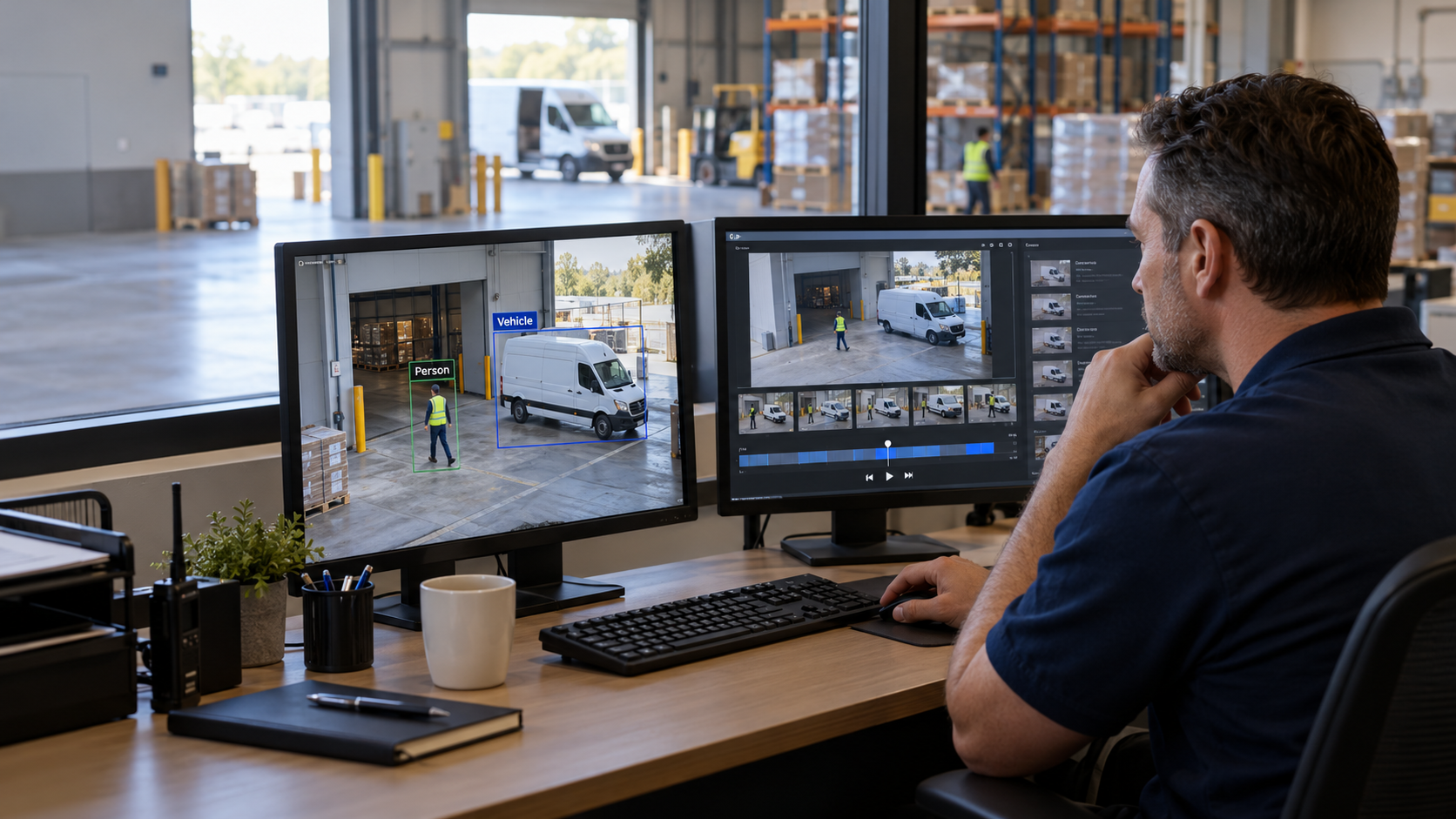
Operator reviewing warehouse surveillance footage with person and vehicle detection boxes on two monitors.
AI helps narrow the footage; a person verifies what happened. AI-generated concept illustration.
AI security cameras Chicago video analytics intelligent video search business surveillance Surveillance

Quick Summary

What business owners and facility teams should know

A camera system can record an entire weekend and still leave a manager spending Monday morning searching for one useful moment. AI can help by sorting events, identifying certain object categories, and narrowing the video that a person needs to review. The improvement is practical: more useful information from the footage a business already depends on.

For Chicago-area warehouses, offices, and managed properties, the buying question should be specific. Can this system help the right person find an incident, recognize an important event, and take the next step? A feature list alone cannot answer that. A demonstration using your entrances, docks, parking areas, and actual lighting conditions is far more valuable.

01

More useful alerts

Person and vehicle classification can help focus notifications on events that matter instead of every movement in the scene.

02

Faster review

Object filters and supported text searches can reduce the video a manager has to review, while human verification remains essential.

03

Infrastructure still matters

Lens selection, lighting, camera position, network capacity, recording, and trained operators remain part of a usable system.

Bottom line: Smarter alerts and faster investigations can make cameras more useful, provided the system is designed around the scene and the people using it.

Compare the approaches

Two ways to approach the decision

Use the same business requirements when comparing approaches. The appropriate choice depends on the building, existing equipment, operating responsibilities, and the outcome being tested.

Approach one

Traditional motion workflow

An operator reviews motion events or a timeline. This can be adequate for a small, quiet location when staff can readily identify the relevant period. Busy scenes may create more review work.

  • Can fit a clearly defined, limited requirement.
  • Confirm the assumptions and limits against your actual installation.

Approach two

Analytics-assisted workflow

Supported classifications and search filters help narrow the events to review. This is worth testing where incident review consumes staff time, but it still requires suitable footage and a person to confirm the result.

  • Creates a defined basis for testing, documentation, and an accountable handoff.

Compare complete scopes: Ask each provider to state the assumptions, inclusions, exclusions, testing, and support responsibilities. Use demonstrated fit rather than a feature count alone.

Laptop showing surveillance video search results with person, vehicle, date, and time filters.

Supported event filters help an operator narrow the recording to relevant clips, then review the evidence. AI-generated concept illustration; not customer footage or a specific product interface.

Putting the plan into practice

A six-step implementation checklist

Use this sequence to turn an initial conversation into a reviewable scope and a useful handoff. Adapt the steps to the systems and owners at your site.

  1. 01

    Choose one problem

    Start with a real review or notification task, such as finding an after-hours dock visit.

  2. 02

    Inventory the system

    Record camera models, recording platform, software, licenses, storage, and available network capacity.

  3. 03

    Design a pilot

    Pick representative scenes and agree on staged events, challenging conditions, and acceptable results.

  4. 04

    Review the results

    Check useful detections, missed events, unwanted alerts, and how easily an operator finds the correct clip.

  5. 05

    Assign access and response

    Document who receives alerts, who reviews video, and who can export or share evidence.

  6. 06

    Expand with a baseline

    Roll out proven settings, train staff, and revisit performance when lighting, layouts, or operations change.

Handoff standard: The final record should identify the installed system, its verified capabilities, any unresolved exceptions, and who owns the next action.

Technician watching a tablet as a worker walks through a warehouse camera coverage area.

A walk test checks the actual scene, distance, camera angle, and recorded result. AI-generated concept illustration; not customer footage or a specific product interface.

Decision framework

Six checks that shape a useful plan

Each card addresses a different part of the decision. Use them together when reviewing the building and comparing an installation scope.

AI Surveillance

Start with the outcome the business needs

Smarter alerts and faster investigations can make cameras more useful, provided the system is designed around the scene and the people using it.

Six connected planning checks

From motion to useful events

Traditional motion detection reacts to changes in an image. Supported analytics can classify moving people or vehicles and apply rules around areas, lines, or dwell time. Axis documents these functions in Object Analytics.[1] For a warehouse, a sensible demonstration is a person entering a restricted loading area after closing. Ask the installer to show routine activity that should be ignored as well as events that should be raised.

Search footage by a useful description

Some video-management platforms support object filters, visual similarity, or free-text search. Axis describes these options in Camera Station Pro.[2] A manager might search for a vehicle description and then review the returned clips. Treat the results as candidates: time, camera, clothing, and movement should be checked against the recording. Feature availability depends on the camera, software, server, licensing, and configuration.

Test the scene instead of the sales presentation

Have someone walk the actual route at the distance the camera must cover. Repeat the test near opening time, at night, and under difficult lighting. Look for missed events and unwanted alerts. Keep a written record of what was tested. A successful daytime demonstration at an entrance does not establish that an entire dark parking lot will perform the same way.

Give every alert an owner

An alert only becomes operationally useful when someone knows what to do with it. Define the event, recipient, hours of coverage, escalation path, and expected response. A property manager may need a notification during business hours and a different procedure after closing. Confirm whether any monitoring service is included; analytics alone does not supply a response team.

Protect the recordings and the search tools

Limit access to people with a business need. Decide who may search, export, share, or delete recordings. Ask how activity is logged and how permissions are removed when staff change. Set retention according to the business purpose and applicable requirements. AI should make an existing surveillance program easier to operate, rather than encourage collecting information without a defined purpose.

Buy an outcome you can measure

Choose a small set of acceptance checks: finding a staged delivery event, receiving a defined intrusion notification, exporting a clip, and identifying who can access it. Record the time and steps needed before and after the pilot. This creates a practical comparison without promising a percentage reduction in incidents or search time that has never been measured at your site.

How to use this framework: Bring the relevant details to the site assessment. The examples and checklists are planning guidance, not a site-specific design or a quotation.

Frequently Asked Questions

Questions to ask before approving the work

These answers address common purchasing, scope, and handoff questions. Exact product capabilities should be checked against the selected equipment and software.

Can AI eliminate false alarms?

No. A useful goal is a better balance of relevant alerts and manageable review work. Demonstrate both ordinary activity and the events you need detected.

Do we need to replace every camera?

Not necessarily. Some systems combine existing cameras with server-based processing; others require compatible edge devices. Verify your exact models and software before planning replacement.

Is AI surveillance the same as facial recognition?

No. Object classification and event rules can work without identifying a person. Facial recognition is a separate capability with separate technical and policy considerations.

Can AI recover detail that was never recorded?

Do not rely on it to create trustworthy missing detail. Plan the original view, exposure, and recording quality around the information you actually need.

Does every search run in the cloud?

No. Processing location varies by product and feature. Ask where video, metadata, and search processing occur, and document the network and privacy implications.

What should Apollo evaluate first?

Begin with the operational problem, representative footage, camera positions, recording workflow, and who will use the system. Then select the capabilities worth demonstrating.

Useful next step: Collect the existing equipment information and the specific problem you want the work to solve.

Plan the next step

Talk through your building and the outcome you need

Apollo Technology & Cabling helps Chicago-area businesses plan and install commercial building technology. Discuss AI surveillance in the context of your existing infrastructure, operations, and support team. Free assessments.

Serving Chicago, the surrounding suburbs, and Northern Illinois commercial facilities.

Written by

Apollo Technology & Cabling

Commercial building technology infrastructure specialists

Practical guidance backed by commercial field experience

Apollo Technology & Cabling designs, installs, supports, and advises on commercial structured cabling, business Wi-Fi, surveillance, access control, audio/video systems, and related building technology infrastructure throughout the Chicago area.

  • Surveillance
  • Commercial Infrastructure Planning
  • Installation & System Handoffs
  • Technology Advisement

Editorial standard: Apollo Knowledge Magazine articles are developed to provide clear, practical, technically grounded guidance for commercial decision-makers. Article-specific claims, recommendations, links, and technical details should be reviewed before publication.

Technical sources and further reading

Sources checked October 17, 2026. Manufacturer examples illustrate capabilities; availability depends on the selected model, software, licenses, and configuration. The site-assessment steps are Apollo editorial planning guidance.

  1. Axis: Object Analytics technical documentation
  2. Axis: Free-text search in Camera Station Pro

Explore Apollo’s surveillance services.